

Applying Global Styles to Your Design System
What Are Global Styles?
Global Styles in Kajoo are overarching design rules defined within your Design System that apply consistently across your entire application. These styles cover foundational elements such as typography, layout, spacing, colors, and more. Think of them as the universal styling layer that ensures your app maintains a cohesive visual identity — no matter how many pages or components you build.
Why Use Global Styles in a Design System?
Global Styles play a critical role in streamlining your design process. Here’s why they matter:
- ✅ Visual Consistency: By applying centralized styling rules, you ensure a unified aesthetic across all screens and components—boosting brand credibility and user trust.
- ⚡ Increased Efficiency: Instead of styling elements individually, define a rule once and apply it globally. This drastically reduces repetitive tasks and makes updating styles much faster.
- 📈 Scalability: As your product grows, new features and components automatically inherit your design rules, minimizing rework and design drift.
- 🎯 Design System Alignment: Global styles complement tokens and elements by acting as a default styling baseline, aligning your system with modern design principles.
How to Use Global Styles in Kajoo
🔹 1. Access Global Styles
- Navigate to your Design System.
- In the sidebar, open the Global Styles section.
This area is specifically designed to house CSS-based rules that apply across your entire project.
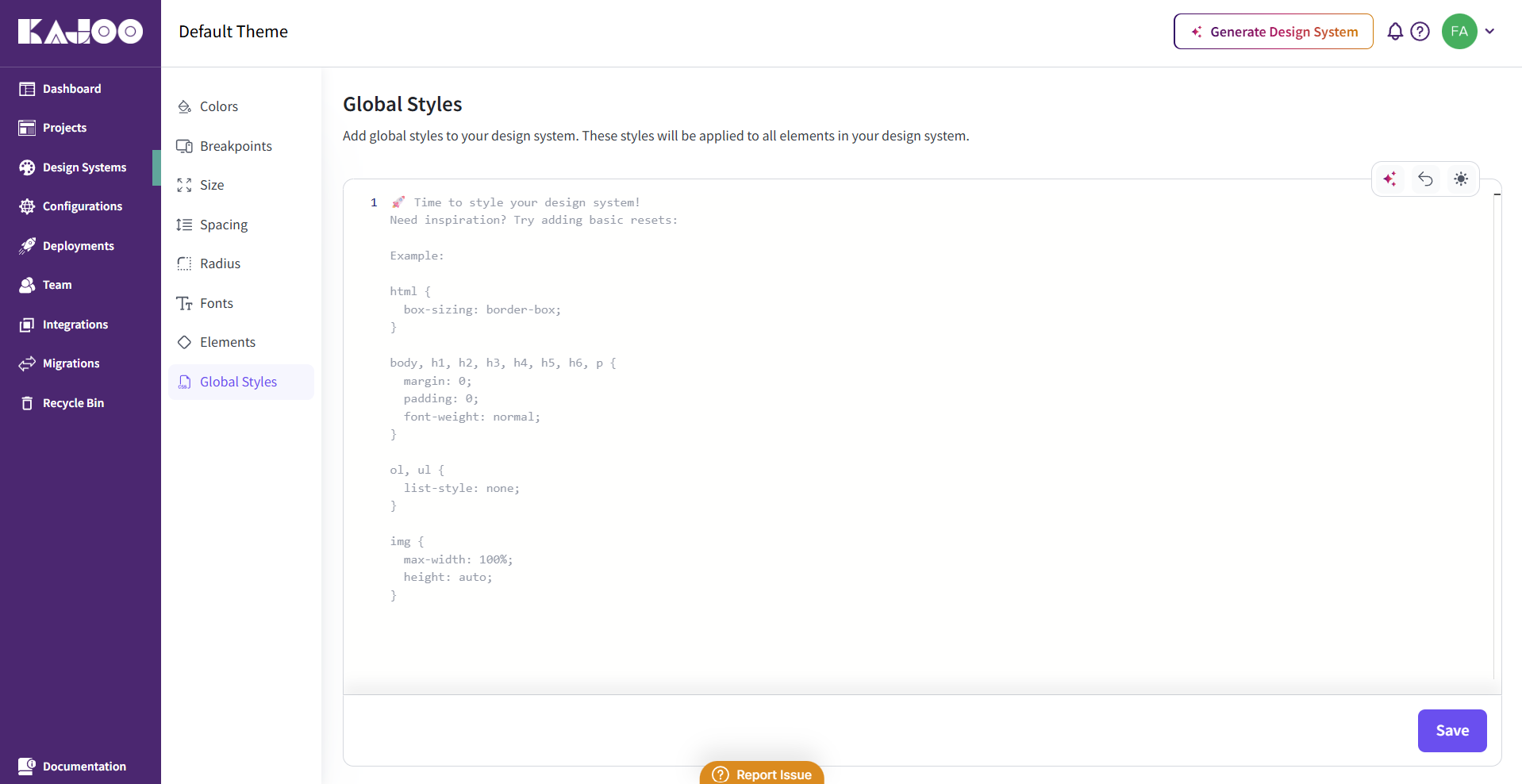
🔹 2. Create a Global Style Class
- Define a class name for your global style (e.g.,
.heading-primary,.container-padding,h1, etc.). - In the code editor, write your CSS rules that apply universally—like font sizes, margins, or background colors
🔹 3. Apply Global Styles to Your Project
Once created, these global styles can be referenced across pages and components. Any element that matches the defined class or selector will inherit these styles, ensuring a consistent baseline without manually reapplying styles in every instance.
🔹 4. Override When Necessary
Global styles act as your default layer — but they’re not restrictive. You can override them locally using:
- Design tokens (e.g., custom color, font, or spacing)
- Inline styles
- Component-specific styles
This gives you full flexibility when unique design decisions are needed—without breaking the system.
✨ Key Benefits
| Feature | Value it Delivers |
|---|---|
| Consistency | Keeps all UI elements aligned with brand and design rules. |
| Efficiency | Saves time by eliminating redundant styling efforts. |
| Scalability | Makes it easier to maintain visual integrity as your app grows. |
| Flexibility | Provides a design baseline that’s easy to override per component. |
Global Styles in Kajoo are beneficial for creating scalable, reliable, and visually consistent design systems. Use them as your design foundation and watch your design system work smarter.
Updated 5 months ago