

Environment Setup
The manual steps you complete before the migration begins — SPE Remoting, IIS configuration, credentials, and environment variables on both your XP and SitecoreAI environments.
This guide covers the Sitecore-side configuration required before running the XP → SitecoreAI migration recipe in Kajoo Agentic. You'll need to complete both sections — one for your source XP environment and one for your target SitecoreAI (formerly XM Cloud) environment.
Once this is done, share the credentials at the bottom of this page with your Kajoo contact. The Kajoo team handles workspace setup from there — see Workspace Setup.
SitecoreAI (formerly XM Cloud)
1. Create the starter repository
Create a new repo from github.com/Sitecore/xmcloud-starter-js.
2. Enable SPE Remoting
In /authoring/platform/, create App_Config/Include/Spe/zzz.spe.remoting.config with this content:
<configuration xmlns:patch="http://www.sitecore.net/xmlconfig/">
  <sitecore>
    <powershell>
      <services>
        <fileDownload><patch:attribute name="enabled">true</patch:attribute></fileDownload>
        <mediaDownload><patch:attribute name="enabled">true</patch:attribute></mediaDownload>
        <remoting>
          <patch:attribute name="requireSecureConnection">true</patch:attribute>
          <patch:attribute name="enabled">true</patch:attribute>
        </remoting>
      </services>
    </powershell>
    <pipelines>
      <owin.cookieAuthentication.validateIdentity>
        <processor type="Sitecore.Owin.Authentication.Pipelines.CookieAuthentication.ValidateIdentity.ValidateSiteNeutralPaths, Sitecore.Owin.Authentication">
          <siteNeutralPaths hint="list">
            <path hint="spe">/sitecore%20modules/PowerShell</path>
          </siteNeutralPaths>
        </processor>
      </owin.cookieAuthentication.validateIdentity>
    </pipelines>
    <log4net><logger name="Spe"><level patch:attribute="value" value="DEBUG"/></logger></log4net>
  </sitecore>
</configuration>
Add the following line to the authoring/platform/Platform.csproj file under the ItemGroup section:
<Content Include="App_Config\Include\Spe\zzz.Spe.remoting.config" />What needs to be added:
- Line to add:
<Content Include="App_Config\Include\Spe\zzz.Spe.remoting.config" /> - Location: Inside the
<ItemGroup>section ofauthoring/platform/Platform.csproj - Position: After the
<Folder Include="App_Config\Include\" />line
Your ItemGroup should look like this after the addition:
<ItemGroup>
  <Folder Include="App_Config\Include\" />
  <Content Include="App_Config\Include\Spe\zzz.Spe.remoting.config" />
</ItemGroup>
3. Deploy the SitecoreAI project
Create the project in the Sitecore Cloud Portal, link your GitHub repo, and trigger the initial deployment.
4. Create automation credentials
In the Cloud Portal go to Credentials → Create New → Automation. Save the Client ID and Client Secret — you'll share these with Kajoo.
5. Set environment variables
Go to Project → Authoring Environment → Variables and add:
| Variable | Value |
|---|---|
Sitecore_GraphQL_ExposePlayground | true |
SITECORE_SPE_ELEVATION | Allow |
Trigger a redeployment after saving — variables don't take effect until the next deploy.
6. Create the SPE Remoting user
In Role Manager, create the role sitecore\PowerShell Extensions Remoting (if it doesn't exist).
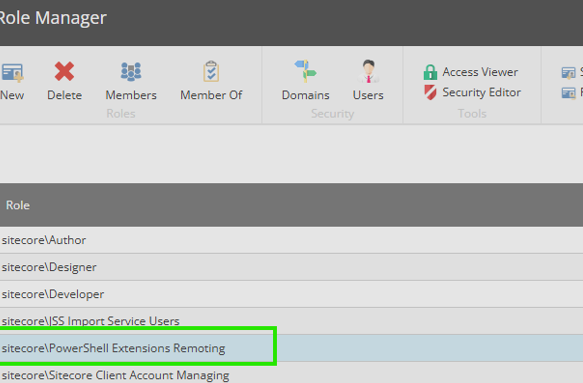
Then in User Manager create a user named SpeRemote, assign that role, and tick Administrator. Save the password — you'll share it with Kajoo.
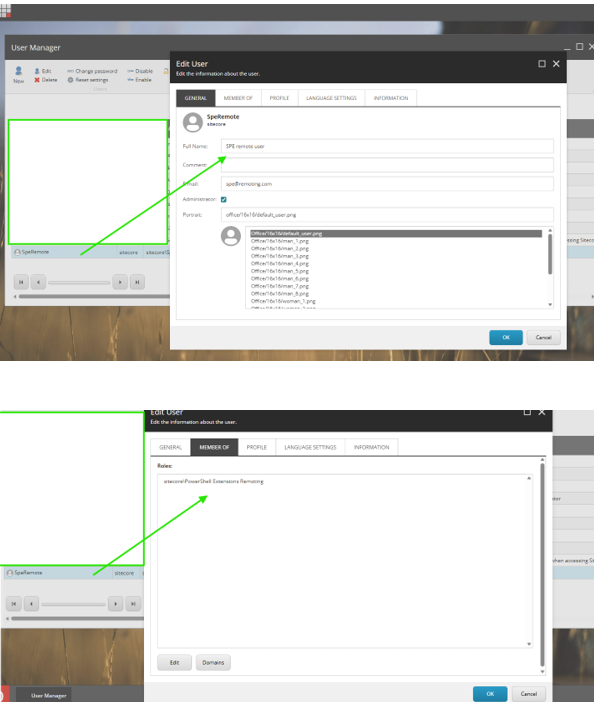
Sitecore XP (Headless)
1. Confirm accessibility
The CM instance must be reachable over HTTPS. If Azure-hosted with restricted access, whitelist the Kajoo Agentic IP 20.51.153.117/32 — confirm the current IP with your Kajoo contact before applying.
2. Verify required modules are installed
You need: Sitecore PowerShell Extensions (SPE), Sitecore Services Client (SSC), Sitecore Management Services, and Headless Services / JSS. If Management Services is missing, download it from developers.sitecore.com/downloads/Sitecore_CLI.
3. Register a non-interactive client
Follow the Sitecore walkthrough for non-interactive client login on your Identity Server. Save the Client ID, Client Secret, and Authority URL — you'll share these with Kajoo.
4. Configure IIS authentication
Apply the IIS authentication settings only to the Sitecore CM website and the PowerShell Services folder.
Do not apply these settings at the IIS server/root level. Configure them only at:
- Sites > Sitecore CM site
- Sites > Sitecore CM site > sitecore modules > PowerShell > Services
Authentication Settings
Configure Authentication for both the CM site and the PowerShell Services folder as follows:
| Setting | Value |
|---|---|
| Anonymous Authentication | Enabled |
| ASP.NET Impersonation | Enabled |
| Basic Authentication | Disabled |
| Windows Authentication | Disabled |
| Forms Authentication | Disabled |
Configuration Methods
You can apply these settings in two ways:
Option 1: IIS Manager
Use the IIS Manager interface to configure the authentication settings directly
Site Level:
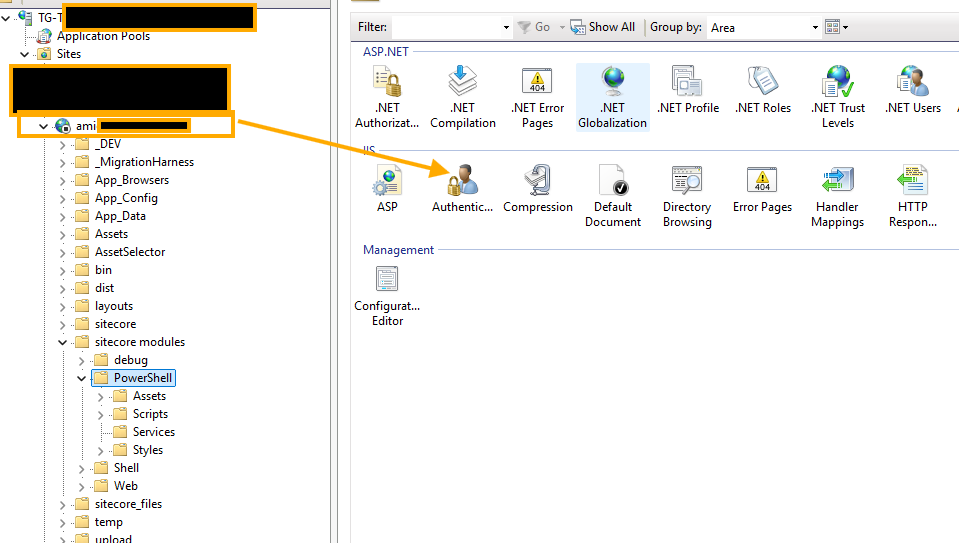
Powershell Level:
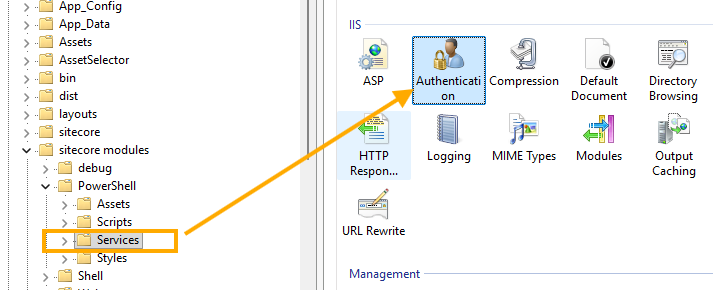
Option 2: Web.config
Add a location-specific entry in the CM site's web.config file for powershell services
<?xml version="1.0" encoding="utf-8"?>
<configuration>

  <!-- your normal root Sitecore config here -->

  <location path="sitecore modules/PowerShell/Services">
    <system.webServer>
      <security>
        <authentication>
          <anonymousAuthentication enabled="true" />
          <basicAuthentication enabled="false" />
          <windowsAuthentication enabled="false" />
        </authentication>
      </security>
    </system.webServer>
  </location>

</configuration>The folder-level step is frequently missed. If SPE Remoting returns 401 Unauthorized, this is almost always the cause.
5. Enable SPE Remoting
Create App_Config/Include/Spe/zzz.spe.remoting.config:
<configuration xmlns:patch="http://www.sitecore.net/xmlconfig/"
  xmlns:role="http://www.sitecore.net/xmlconfig/role/"
  xmlns:security="http://www.sitecore.net/xmlconfig/security/">
  <sitecore role:require="Standalone or ContentManagement" security:require="Sitecore">
    <powershell>
      <services>
        <fileDownload><patch:attribute name="enabled">true</patch:attribute></fileDownload>
        <mediaDownload><patch:attribute name="enabled">true</patch:attribute></mediaDownload>
        <remoting>
          <patch:attribute name="requireSecureConnection">true</patch:attribute>
          <patch:attribute name="enabled">true</patch:attribute>
        </remoting>
      </services>
    </powershell>
    <pipelines>
      <owin.cookieAuthentication.validateIdentity>
        <processor type="Sitecore.Owin.Authentication.Pipelines.CookieAuthentication.ValidateIdentity.ValidateSiteNeutralPaths, Sitecore.Owin.Authentication">
          <siteNeutralPaths hint="list">
            <path hint="spe">/sitecore%20modules/PowerShell</path>
          </siteNeutralPaths>
        </processor>
      </owin.cookieAuthentication.validateIdentity>
    </pipelines>
    <log4net><logger name="Spe"><level patch:attribute="value" value="DEBUG"/></logger></log4net>
  </sitecore>
</configuration>
The role:require attribute scopes this to CM/Standalone only — intentional on XP topologies that include CD servers.
6. Create the SPE Remoting user
Same as SitecoreAI step 6: create role sitecore\PowerShell Extensions Remoting, create user SpeRemote with that role and Administrator privileges. Save the password.
7. Validate the GraphQL endpoint
Confirm /sitecore/api/graph/items/master returns a valid response before sharing credentials with Kajoo.
Credentials to share with Kajoo
Once setup is complete, send these to your Kajoo contact via a secure channel.
SitecoreAI instance
| Item | Where to find it |
|---|---|
| Authoring URL | Sitecore Cloud Portal |
| SpeRemote username + password | Step 6 above |
| Automation Client ID + Secret | Step 4 above |
XP instance
| Item | Where to find it |
|---|---|
| CM Base URL | Your environment |
| Identity Server URL | Your environment |
| SpeRemote username + password | Step 6 above |
| Non-interactive Client ID + Secret | Step 3 above |
| GraphQL API Key | /sitecore/system/Settings/Services/API Keys |
Common issues
| Problem | Fix |
|---|---|
| 401 Unauthorized on PowerShell | Check IIS auth at the /sitecore modules/PowerShell/Services folder level (XP step 4) |
| PowerShell won't connect | Verify the SPE patch is deployed and SpeRemote has the correct role and admin privileges |
| GraphQL endpoint not responding | Confirm Headless Services is installed (XP) or env variables are set and redeployed (SitecoreAI) |
| Management Services missing | Install from Sitecore CLI downloads (XP step 2) |
| Azure access blocked | Whitelist 20.51.153.117/32 — confirm current IP with Kajoo first |
| SitecoreAI env vars not taking effect | Redeploy after saving variables (SitecoreAI step 5) |
Updated about 1 month ago