

Using Kajoo XM Cloud Starter Templates
This guides outlines specific steps for implementing Sitecore XM Cloud. It uses a Kajoo-specific template repository as a starting point, which can be found here: https://docs.kajoo.ai/docs/how-to-add-the-kajoo-plugin-to-a-sitecore-repository.
Use these steps only if the Kajoo starter template is up to date with the XM Cloud Foundation Head repository (which the Kajoo template is based on). Otherwise, you may need to manually update XM Cloud dependencies. The recommended approach is to follow the How to Add the Kajoo Plugin to a Sitecore Repository guide. This guide explains how to integrate the Kajoo plugin into any Sitecore XM Cloud solution, including those using the XM Cloud Foundation Head repository.
Get started with Kajoo template for Sitecore XM Cloud
-
Begin by accessing the Kajoo Foundation template for XM Cloud at: https://github.com/TechGuilds/xmcloud-kajoo-head.
-
Click the
Use this templatebutton and selectCreate a new repositoryoption.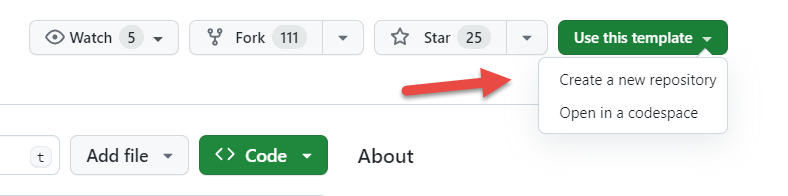
-
Follow the steps for creating a new repository from a template as outlined in the official Github documentation: https://docs.github.com/en/repositories/creating-and-managing-repositories/creating-a-repository-from-a-template.
-
You can now deploy this repository to Sitecore XM Cloud. For more information about deployment, refer to the official Sitecore XM Cloud documentation: https://doc.sitecore.com/xmc/en/developers/xm-cloud/deploying-xm-cloud.html.
Updated 5 months ago