

Recipes
Pre-configured workspace templates for DXP migration, Figma-to-DXP delivery, and content operations — ready to provision in one step.
A recipe is a pre-configured workspace template for a specific DXP delivery use case. When you create a workspace from a recipe, Kajoo automatically provisions the full agent team, MCP connections, skills, and tool configurations needed for that workflow — along with a setup wizard to connect your environments.
Recipes encode proven delivery knowledge. You don't assemble agents from scratch; you start from a recipe, connect your project, and begin working.
You can also build a workspace from scratch for custom workflows. See Getting Started for details. Your organization can add its own recipes from GitHub in the Recipe Library, and the Recipe Builder — coming soon — will let you remix and customize existing recipes directly inside Kajoo Agentic.
Production recipes
DXP Migration
| Recipe | Source | Target | Status |
|---|---|---|---|
| Sitecore Migration v3 | Sitecore XP | SitecoreAI (formerly XM Cloud) SXA Headless | ✅ Available |
| XP → SitecoreAI Migration (Sitecore Migration v2) | Sitecore XP Headless | SitecoreAI (formerly XM Cloud) SXA Headless | ✅ Available |
The XP → SitecoreAI Migration guide describes Sitecore Migration v2. It covers the full migration — code, content, and presentation — in six phases: source setup, then five orchestrated migration phases. It provisions 21 specialized agents, 5 MCP connections, and 32 skills.
Sitecore Migration v3
Sitecore Migration v3 runs your migration with a dynamic workflow. Instead of starting every project with the same fixed phases, it builds the plan on your task board as the migration goes, based on what your site actually contains.
A plan that builds itself
The workflow is described in the recipe's skills, not hard-wired into Kajoo. When you start a migration, the orchestrator puts a Setup phase and its tasks on your task board:
- Set up source platform
- Set up target platform
- Complete CMS-specific setup
- Audit Setup evidence
- Prepare Discovery plan
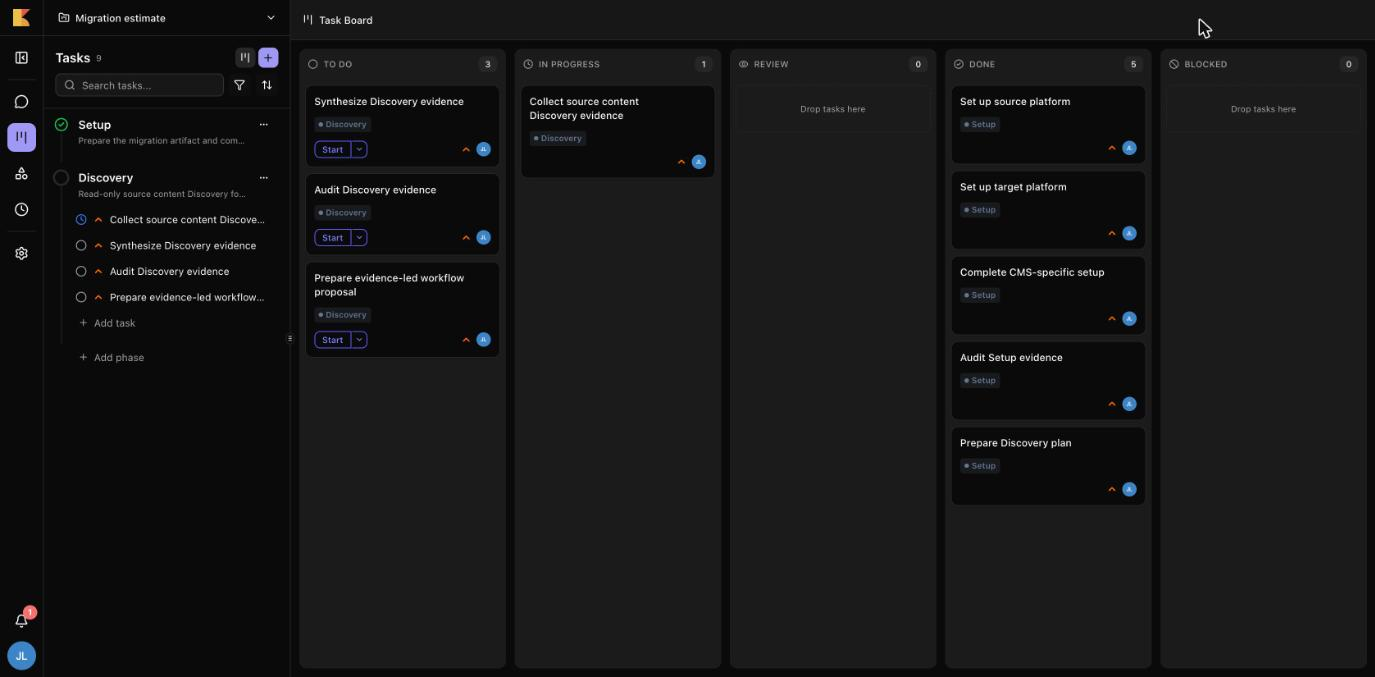
The last Setup task prepares the Discovery phase. Discovery studies your code and content, and its findings decide which phases come next — for example Code Migration, Content Migration, SXA Conversion and Resolver Adapters. Those phases appear on the board once you approve the plan.
Every step knows what it waits for
Each task lists the tasks it depends on. Before running anything, the orchestrator checks that those are done, and if they aren't, it tells you what is still blocking it — for example, that Discovery can't start until Setup is finished. A task that is waiting for information you haven't given yet is kept as a draft until it's ready.
You stay at the controls
Finishing a phase never starts the next one. The orchestrator stops at each gate: it asks before moving from Setup to Discovery, and after Discovery it asks you to approve the plan for the later phases. At each gate you can continue, pause, or carry on in a new chat.
Follow the migration
- The task board shows every phase and task, and where each one stands.
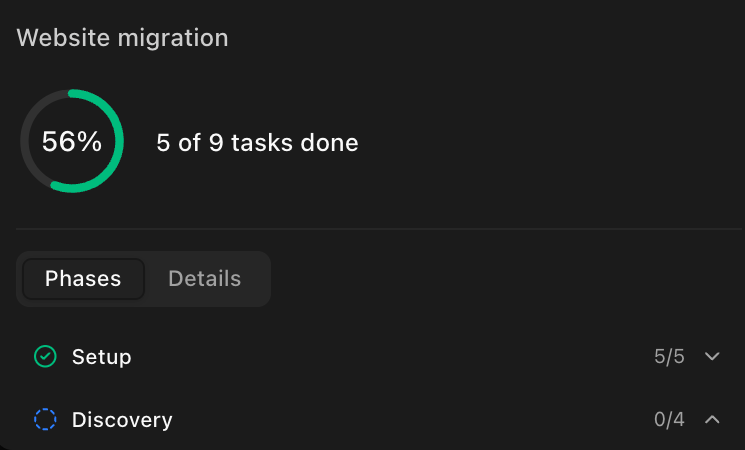
- In the chat, open + → References to see the migration's progress: how many tasks are done, which are blocked or waiting for review, and each phase's status. Click a task to open it.
Run a step again
To repeat a task, set it back to To do and use its Start button. A new attempt keeps the files from earlier attempts. If you reopen a task that others depend on, their results are reset so they run again with the new input.
v3 or v2?
Sitecore Migration v2 starts every project with the same six phases and their first tasks, described in the XP → SitecoreAI Migration guide. Sitecore Migration v3 starts with Setup and Discovery and adds only the phases your site needs.
Recipe Library
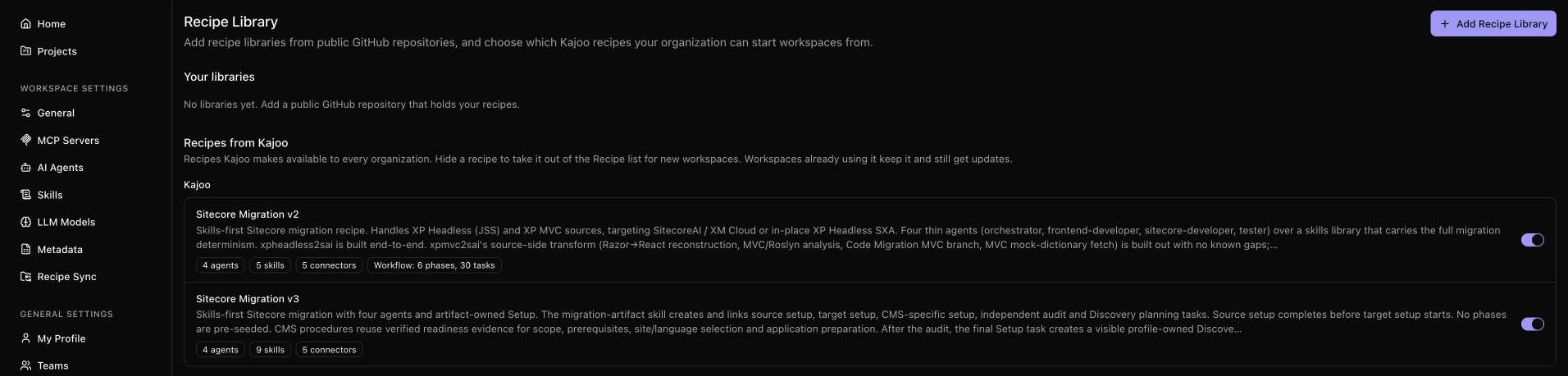
Recipes come from recipe libraries: Kajoo's own, and any your organization adds. Go to General Settings → Recipe Library. Anyone in the organization can look; adding, editing and deleting libraries needs the Manage Organization Settings permission.
Add your own recipes
- Click Add Recipe Library.
- Enter a Name, the GitHub URL of the repository, and the Branch to use. The repository must be public on GitHub.
- Kajoo checks the repository for recipes and adds them to your recipe list.
A recipe is a folder in the repository with a .kajoo/recipe.json file. Your organization can have up to 20 libraries, each with up to 100 recipes.
Click a library to see its recipes. Each one lists what it includes: agents, skills, prompt templates, connectors, and its workflow's phases and tasks.
Choose which Kajoo recipes to use
Under Recipes from Kajoo, switch off any recipe your organization shouldn't start new workspaces from. Workspaces already using it keep it and still get its updates.
Remove a library
Use Delete in the library's … menu. Workspaces created from its recipes keep all their agents, skills and prompts.
Keep a workspace in sync with its recipe
A workspace created from a recipe stays linked to it. Go to Workspace Settings → Recipe Sync to see the recipe's version and whether a newer one exists.

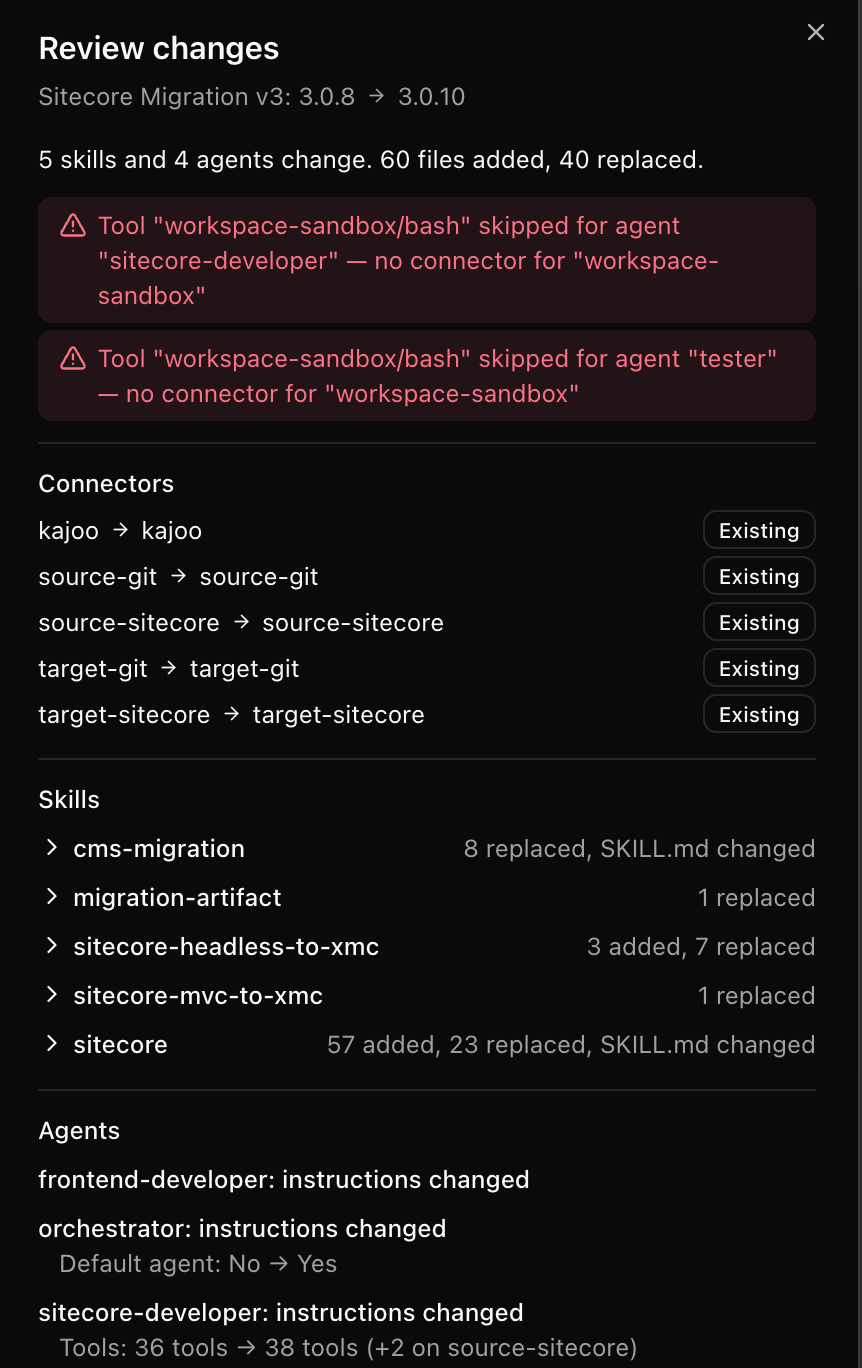
- Update (or Re-apply Recipe) brings in the recipe's latest agents, skills and prompts. If the recipe's connections need mapping to your workspace's, you do that first in Connector Mapping. Then Review changes opens. It lists every agent, skill and prompt that would change, the files added, replaced or removed with the changed lines, how the connections will be used, and any warnings. Nothing changes until you click Apply changes. If the workspace already matches the recipe, the window says so. If the workspace or the recipe changes while you are reviewing, Apply stops and asks you to review again.
- Detach stops the link: the workspace keeps all its agents, skills, prompts and settings, and later recipe updates no longer change them. You can only undo this by applying a recipe again.
You need edit access to the workspace to do either.
The Review changes window for an update:
Coming soon
DXP Migration
The Sitecore migration recipes establish the pattern. The next wave expands the migration matrix to cover additional source and target DXPs across the composable landscape.
| Recipe | Status |
|---|---|
| MVC → SitecoreAI Migration | In development |
| Any DXP → Any DXP | Roadmap |
Figma to DXP
Design-to-code delivery automation. Go from Figma designs to production-ready DXP components with an agentic workflow that handles component generation, design system alignment, and DXP registration.
| Recipe | Status |
|---|---|
| Figma → SitecoreAI | In development |
| Figma → Any DXP | Roadmap |
DXP Content Ops
Agentic content operations for ongoing DXP delivery — structured content workflows, content optimization, SEO/GEO enrichment, and content migration at scale.
| Recipe | Status |
|---|---|
| Content Optimization & GEO/SEO | In development |
| Content Migration at Scale | Roadmap |
Recipe Builder
Kajoo Agentic will include a Recipe Builder directly inside the workspace. Teams will be able to:
- Remix existing recipes — adjust agents, swap skills, change tool permissions
- Build entirely new recipes from scratch
- Save recipes to their organization for reuse across projects
- Share recipes across teams
The Recipe Builder is designed for delivery leads and architects who want to codify their own delivery methodology into a reusable, provisionable template — without writing infrastructure code.
What's next
| Ready to start a migration? | See XP → SitecoreAI Migration for the v2 recipe guide, or Sitecore Migration v3 above |
| Follow the plan as it runs | See Tasks and phases |
| New to Kajoo Agentic? | Start with Getting Started to create your first workspace |
Updated 12 days ago