---
updatedAt: 2026-08-25T18:24:12.000Z
agentTools:
projectIndex: https://docs.kajoo.ai/llms.txt
---
# Environment Setup
The manual steps you complete before the migration begins — SPE Remoting, IIS configuration, credentials, and environment variables on both your XP and SitecoreAI environments.
This guide covers the Sitecore-side configuration required before running the XP → SitecoreAI migration recipe in Kajoo Agentic. You'll need to complete both sections — one for your source XP environment and one for your target SitecoreAI (formerly XM Cloud) environment.
Once this is done, share the credentials at the bottom of this page with your Kajoo contact. The Kajoo team handles workspace setup from there — see [Workspace Setup](https://docs.kajoo.ai/docs/sitecore-xp-to-sitecoreai-workspace-setup).
***
## SitecoreAI (formerly XM Cloud)
**1. Create the starter repository**
Create a new repo from [github.com/Sitecore/xmcloud-starter-js](https://github.com/Sitecore/xmcloud-starter-js).
**2. Enable SPE Remoting**
In `/authoring/platform/`, create `App_Config/Include/Spe/zzz.spe.remoting.config` with this content:
```xml
true
true
true
true
/sitecore%20modules/PowerShell
```
Add the following line to the `authoring/platform/Platform.csproj` file under the `ItemGroup` section:
```
```
**What needs to be added:**
* **Line to add:** ``
* **Location:** Inside the `` section of `authoring/platform/Platform.csproj`
* **Position:** After the `` line
Your `ItemGroup` should look like this after the addition:
```
```
**3. Deploy the SitecoreAI project**
Create the project in the Sitecore Cloud Portal, link your GitHub repo, and trigger the initial deployment.
**4. Create automation credentials**
In the Cloud Portal go to **Credentials → Create New → Automation**. Save the Client ID and Client Secret — you'll share these with Kajoo.
**5. Set environment variables**
Go to **Project → Authoring Environment → Variables** and add:
| Variable | Value |
| ----------------------------------- | ------- |
| `Sitecore_GraphQL_ExposePlayground` | `true` |
| `SITECORE_SPE_ELEVATION` | `Allow` |
Trigger a redeployment after saving — variables don't take effect until the next deploy.
**6. Create the SPE Remoting user**
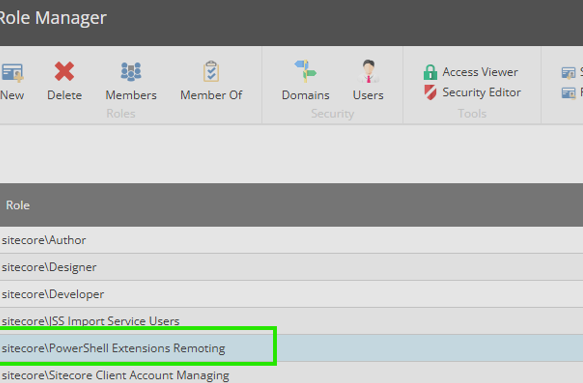
In Role Manager, create the role `sitecore\PowerShell Extensions Remoting` (if it doesn't exist).
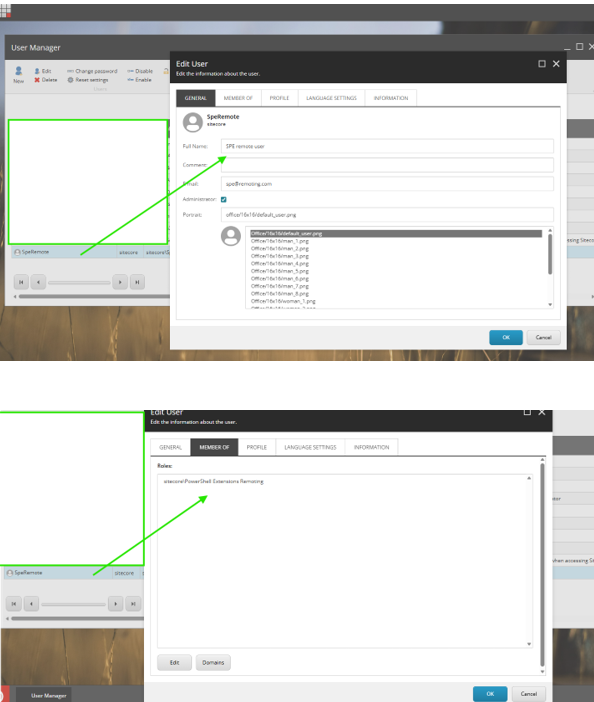
Then in User Manager create a user named `SpeRemote`, assign that role, and tick Administrator. Save the password — you'll share it with Kajoo.
***
## Sitecore XP (Headless)
**1. Confirm accessibility**
The CM instance must be reachable over HTTPS. If Azure-hosted with restricted access, whitelist the Kajoo Agentic IP `20.51.153.117/32` — confirm the current IP with your Kajoo contact before applying.
**2. Verify required modules are installed**
You need: Sitecore PowerShell Extensions (SPE), Sitecore Services Client (SSC), Sitecore Management Services, and Headless Services / JSS. If Management Services is missing, download it from [developers.sitecore.com/downloads/Sitecore\_CLI](https://developers.sitecore.com/downloads/Sitecore_CLI).
**3. Register a non-interactive client**
Follow the [Sitecore walkthrough for non-interactive client login](https://doc.sitecore.com/xp/en/developers/104/developer-tools/configure-a-non-interactive-client-login.html) on your Identity Server. Save the Client ID, Client Secret, and Authority URL — you'll share these with Kajoo.
**4. Configure IIS authentication**
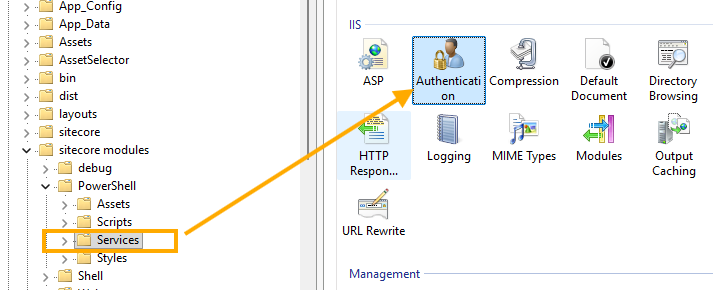
Apply the IIS authentication settings only to the Sitecore CM website and the PowerShell Services folder.
Do not apply these settings at the IIS server/root level. Configure them only at:
* **Sites** > **Sitecore CM site**
* **Sites** > **Sitecore CM site** > **sitecore modules** > **PowerShell** > **Services**
### Authentication Settings
Configure Authentication for both the CM site and the PowerShell Services folder as follows:
| Setting | Value |
| ------------------------ | -------- |
| Anonymous Authentication | Enabled |
| ASP.NET Impersonation | Enabled |
| Basic Authentication | Disabled |
| Windows Authentication | Disabled |
| Forms Authentication | Disabled |
### Configuration Methods
You can apply these settings in two ways:
#### Option 1: IIS Manager
Use the IIS Manager interface to configure the authentication settings directly
Site Level:
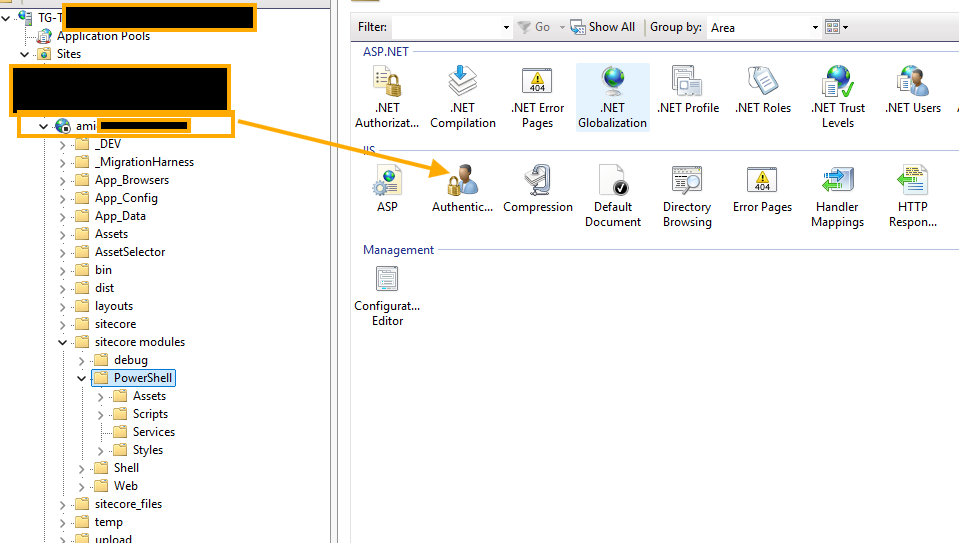
Powershell Level:
#### Option 2: Web.config
Add a location-specific entry in the CM site's `web.config` file for powershell services
```xml
```
The folder-level step is frequently missed. If SPE Remoting returns 401 Unauthorized, this is almost always the cause.
**5. Enable SPE Remoting**
Create `App_Config/Include/Spe/zzz.spe.remoting.config`:
```xml
true
true
true
true
/sitecore%20modules/PowerShell
```
The `role:require` attribute scopes this to CM/Standalone only — intentional on XP topologies that include CD servers.
**6. Create the SPE Remoting user**
Same as SitecoreAI step 6: create role `sitecore\PowerShell Extensions Remoting`, create user `SpeRemote` with that role and Administrator privileges. Save the password.
**7. Validate the GraphQL endpoint**
Confirm `/sitecore/api/graph/items/master` returns a valid response before sharing credentials with Kajoo.
***
## Credentials to share with Kajoo
Once setup is complete, send these to your Kajoo contact via a secure channel.
**SitecoreAI instance**
| Item | Where to find it |
| ----------------------------- | --------------------- |
| Authoring URL | Sitecore Cloud Portal |
| SpeRemote username + password | Step 6 above |
| Automation Client ID + Secret | Step 4 above |
**XP instance**
| Item | Where to find it |
| ---------------------------------- | --------------------------------------------- |
| CM Base URL | Your environment |
| Identity Server URL | Your environment |
| SpeRemote username + password | Step 6 above |
| Non-interactive Client ID + Secret | Step 3 above |
| GraphQL API Key | `/sitecore/system/Settings/Services/API Keys` |
***
## Common issues
| Problem | Fix |
| ------------------------------------- | ------------------------------------------------------------------------------------------------ |
| 401 Unauthorized on PowerShell | Check IIS auth at the `/sitecore modules/PowerShell/Services` folder level (XP step 4) |
| PowerShell won't connect | Verify the SPE patch is deployed and SpeRemote has the correct role and admin privileges |
| GraphQL endpoint not responding | Confirm Headless Services is installed (XP) or env variables are set and redeployed (SitecoreAI) |
| Management Services missing | Install from Sitecore CLI downloads (XP step 2) |
| Azure access blocked | Whitelist `20.51.153.117/32` — confirm current IP with Kajoo first |
| SitecoreAI env vars not taking effect | Redeploy after saving variables (SitecoreAI step 5) |